Most Creators Are Stocking the Wrong Shelf
Ad revenue alone is a fragile business. CPMs fluctuate, demonetizations happen, and the ceiling is determined entirely by YouTube's payout rates — not by the value you deliver to viewers. YouTube Shopping affiliate quietly crossed 250,000 active creators in 2025, and the channels leveraging it correctly are building revenue streams that outperform AdSense on a per-view basis.
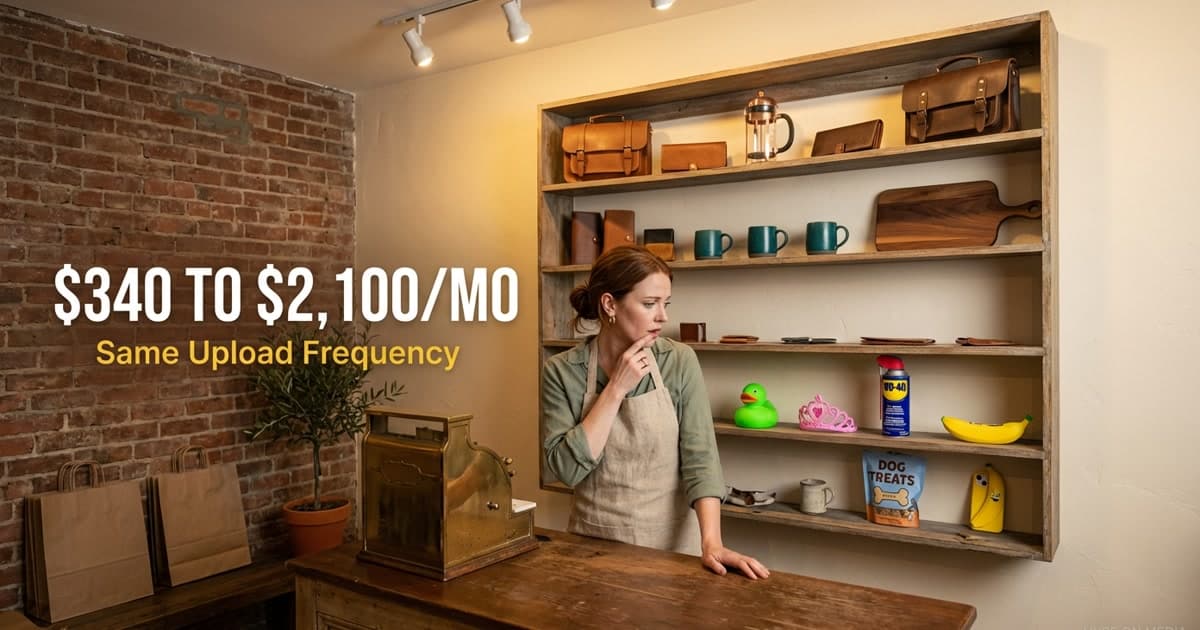
Here's the analogy: YouTube Shopping is a shelf behind the checkout counter — the products sit right where the viewer is already reaching for their wallet, with zero friction. No "click the link in the description." No "use code CREATOR20." The tag is IN the video, AT the moment the viewer is most interested. But most creators are stocking that shelf blindly — slapping baby toys next to power tools, tagging products that have nothing to do with the content, overwhelming viewers with 15 random tags instead of 3 curated ones. The channels winning with Shopping treat that shelf like a boutique display: every product intentionally chosen, positioned at the exact moment of highest purchase intent.
The difference: a 0.3% tag conversion rate versus a 3-5% conversion rate. Same feature. Same shelf. Different curation.
What the YouTube Shopping Affiliate Program Actually Is
YouTube Shopping affiliate allows eligible YPP creators to tag products from partner brands in their videos, Shorts, and live streams. When viewers purchase tagged products, the creator earns a commission — typically 1-20% depending on the product category and brand terms.
The program expanded significantly through 2024-2025. YouTube opened Shopping features to all creators with 20,000+ subscribers in the US, UK, Brazil, Canada, and Australia before expanding globally. Shopping-related watch time grew over 250% year-over-year as YouTube integrated product discovery more deeply into the viewing experience.
The key distinction from external affiliate programs: YouTube Shopping tags appear natively in the video player, pinned in the description, and in dedicated Shopping shelves. They do not require viewers to leave the platform or remember a discount code. Friction reduction is the core advantage — the shelf is right behind the counter, not in a separate store across the street.
The Four Placement Categories That Actually Convert
Our data across client channels shows that product tag placement — not product selection — is the primary driver of conversion rate differences. Tags in the wrong context are invisible. Tags in the right context feel like helpful recommendations, not advertising.
In-context product reveals convert at the highest rate. When a creator holds up a product, demonstrates it, or shows it on screen and the tag appears simultaneously, viewers are primed to purchase. Contextual tags convert at 2.8x the rate of background tags.
Tutorial completion moments are the second-highest converting placement. At the end of a tutorial — "here's the exact blender I used for everything in this video" — the viewer has already validated that the product produces results they want. The tag is the answer to a question they've been building throughout the watch session.
Comparison segments work particularly well for review and tech channels. "Between these three options, we recommend X for most people" followed by a Shopping tag captures the decision-ready segment.
Live stream pinned products perform differently from video tags. In live contexts, pinning a product during discussion creates real-time purchase spikes. Shopping live streams see engagement rates 4-7x higher than post-production tags.
Building a Product-First Content Calendar
The mistake most creators make is approaching Shopping affiliate backwards — producing content and then searching for relevant products to tag. The channels generating meaningful revenue treat product selection as a content planning input, not an afterthought.
At Hype On, we integrate Shopping strategy into client content calendars from the brief stage. The process: identify the 10-15 products most naturally relevant to the channel's content category, check affiliate availability and commission rates, then plan quarterly content themes that organically create opportunities for contextual product placement.
For a cooking channel, this means a quarterly "kitchen setup" or "tools I use" content block that anchors Shopping tags across a cluster of recipe content. For a fitness channel, a "full home gym under $500" video creates a tagging foundation referenced across months of workout content.
One client channel in the home improvement space went from $340/month in AdSense to $2,100/month in combined AdSense + Shopping affiliate revenue within six months of implementing this approach — without increasing upload frequency. Same number of videos. Better shelf curation.
Commission Rate Optimization
Not all affiliate relationships are equal. Understanding the rate landscape determines which products are worth featuring prominently.
High-commission categories: software and SaaS tools (15-30%), luxury goods (8-15%), and specialty electronics (5-10%). Low-commission categories — apparel basics, books, consumables — rarely justify prominent placement unless volume is extremely high.
Our approach: feature products with commission rates above 8% in prominent, contextual placements. Products below 4% only appear in background or incidental placements. The arithmetic: a 1% commission on a $30 product requires 333 purchases to generate $100. A 12% commission on a $150 product requires 5.5 purchases.
Stock the shelf with high-margin products where the viewer is most likely to buy. Don't waste premium shelf space on impulse items with razor-thin margins.
Quality Integration: The Anti-Salesy Framework
The fear most creators have about Shopping integration is sounding like an infomercial. This concern is valid — Shopping content that feels transactional erodes audience trust, and trust is the actual asset being monetized.
Never tag a product you wouldn't recommend regardless of commission. One poor recommendation undermines years of trust-building.
Limit tags per video. Three to five well-chosen, contextually appropriate product tags outperform fifteen tags on everything visible on camera. Curation signals quality.
Disclose clearly and early. "Some links are affiliate links" — positioned at the start of descriptions — is both legally required and trust-building.
Track conversion data and iterate. YouTube Studio Shopping analytics shows click-through rates and purchase attribution by product and video. Channels that review this data monthly and cut underperforming products see compounding improvement.
What Comes Next for YouTube Shopping
YouTube's trajectory with Shopping is clear: deeper product integrations in YouTube TV, AI-powered product recommendations during videos, and expanded commerce features in Shorts. The direction is toward making YouTube a full commerce destination rather than an advertising medium with a checkout function.
The channels positioning themselves as trusted product curators now — building Shopping integration as a first-class content discipline — will have a compounding advantage as these features mature. We predicted in late 2024 that shopping affiliate would become a top-3 revenue stream for lifestyle and review channels by 2026. Early 2025 data confirms the trajectory.
Frequently Asked Questions
How many subscribers do you need for YouTube Shopping affiliate?
YouTube requires YPP membership (1,000 subscribers, 4,000 watch hours or 10 million Shorts views) to access Shopping features. Some direct brand partnerships have additional thresholds — typically 10,000-20,000 subscribers. Requirements vary by country and continue evolving.
What commission rates does YouTube Shopping pay?
Commission rates are set by individual brands: technology (3-8%), fashion (5-15%), home goods (4-10%), software and subscriptions (10-30%). YouTube does not take a cut of Shopping affiliate commissions — the relationship is directly between creator and brand.
How does YouTube Shopping compare to traditional affiliate links?
YouTube Shopping tags eliminate the click-to-external-site friction of traditional affiliate links. Our data shows in-platform product tags convert at 2-4x the rate of description link programs — primarily because viewers don't need to leave the platform or navigate a separate purchase flow.
Can you use YouTube Shopping on Shorts?
Yes. Product tags on Shorts appear as a shopping bag icon overlay. YouTube has begun surfacing commerce-relevant Shorts in dedicated Shopping feeds. Short-form product demos and unboxings have emerged as a high-efficiency format for Shopping affiliate revenue.
What happens if a viewer doesn't purchase immediately?
YouTube's attribution window typically ranges from 7 to 30 days depending on brand agreement. If a viewer clicks a product tag and purchases within the window — even after leaving and returning — the creator receives the commission. A single well-performing Shopping video can generate revenue weeks after publication.